WordPress / WooCommerce plugin
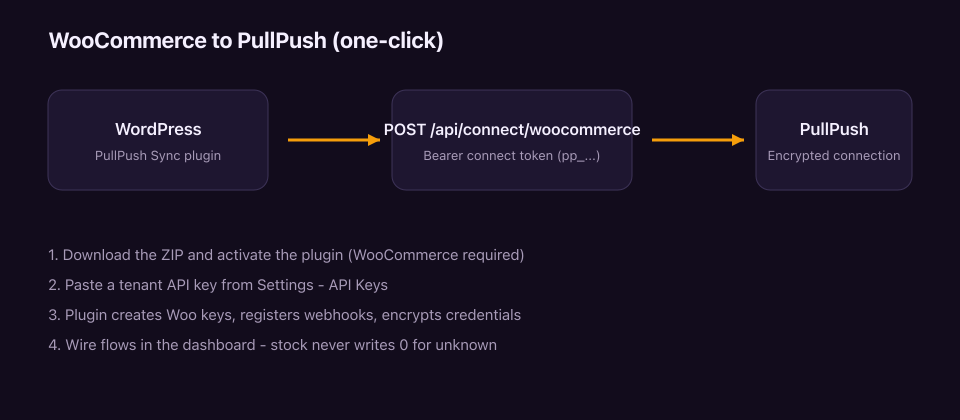
PullPush Sync for WooCommerce connects a WooCommerce store to PullPush with one-click setup: the plugin provisions REST API keys, registers webhooks, and hands credentials to PullPush so you never paste keys by hand.
Status: Plugin ZIP is available below. WordPress.org directory listing is not submitted yet — finish the docs gate, then submit. Until then, install via ZIP.
Download
- Stable ZIP: pullpush-sync.zip
- Versioned: pullpush-sync-1.0.0.zip
Requirements
- WordPress 5.8+, PHP 7.4+
- WooCommerce 6.0+ (HPOS compatible)
- A PullPush account and tenant API key (
pp_…) used as the connect token
Install (ZIP)
- Download pullpush-sync.zip.
- In WordPress: Plugins → Add New → Upload Plugin.
- Activate PullPush Sync for WooCommerce.
Connect
- In PullPush: create or copy a tenant API key (Settings → API Keys).
- In WordPress: WooCommerce → PullPush Sync.
- Paste the connect token and click Connect to PullPush.
- The plugin:
- Creates a WooCommerce REST API key (read/write)
- Calls
POST https://api.pullpush.ai/api/connect/woocommerce - Registers webhooks for
order.created,order.updated,product.updated
On success you get SOURCE (and usually DESTINATION) WooCommerce connections in PullPush with encrypted credentials.
Manual fallback
If the store cannot reach PullPush during connect, the plugin shows the generated keys once so you can paste them into a WooCommerce connection in the dashboard.
What syncs
Configured through PullPush flows (not inside WordPress):
- Stock — per SKU / variation; never writes
0for “unknown” - Orders — outbound to fulfilment / accounting / 3PL destinations
- Products — catalog and variation updates as mapped
See Connections and Sync types.
Disconnect
WooCommerce → PullPush Sync → Disconnect revokes the API key and removes webhooks the plugin created.
Uninstall
Deleting the plugin runs uninstall.php, which cleans up keys and webhooks when
possible.
Security
- Connect token = your tenant API key — treat it like a password
- Store credentials are encrypted at rest in PullPush (
configEncrypted) - Webhook ingress verifies
x-wc-webhook-signature
Related
- REST API — Woo connect (
POST /api/connect/woocommerce) - Usage guide
- Getting started