ChatGPT — use PullPush as an MCP App
Connect your PullPush account to ChatGPT and run integrations from chat: create connections, preview syncs, triage failures, and use interactive widgets — without leaving the conversation.
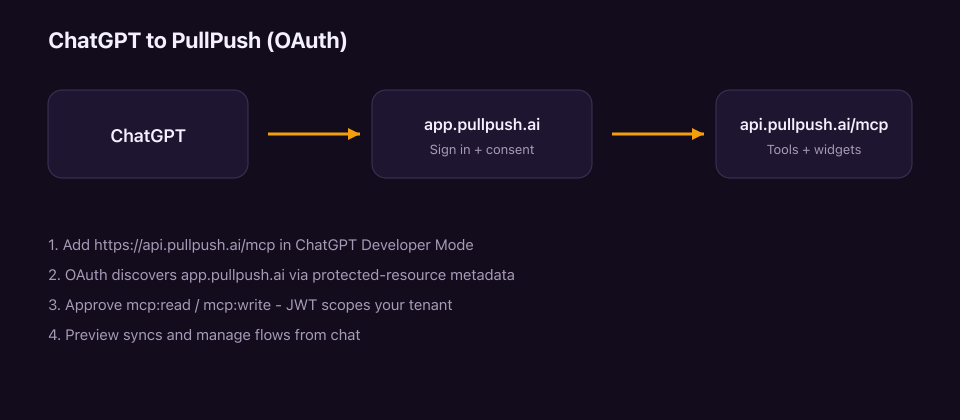
PullPush speaks MCP over Streamable HTTP with OAuth 2.1 (PKCE). The same remote endpoint powers Cursor, Claude, and other MCP clients (API keys); ChatGPT uses OAuth so you sign in as a normal PullPush user.
Before you start
- A PullPush account at app.pullpush.ai
- ChatGPT with access to Connected apps / Developer Mode (required until the public listing is live)
Public marketplace listing is not open yet — we are finishing docs first. Developer Mode works against production today.
Connect in Developer Mode
In ChatGPT open Settings → Connected apps → Developer Mode
Add the MCP endpoint:
https://api.pullpush.ai/mcpChatGPT discovers OAuth from
https://api.pullpush.ai/.well-known/oauth-protected-resourceSign in on
app.pullpush.aiand approve scopes on the consent screenChatGPT receives a JWT and can call MCP tools for your tenant
What you can do
- Browse connectors and create / test connections
- Suggest mappings and create flows (prefer shadow mode first)
- Preview source vs destination diffs before any write
- Inspect health, deliveries, and dead letters
- Use interactive widgets where the host supports MCP Apps HTML
Full tool catalog: MCP tools. Machine-readable server card: api.pullpush.ai/.well-known/mcp-server-card.json.
Scopes
| Scope | Meaning |
|---|---|
openid / profile / email |
Identity |
mcp:read |
List, preview, health |
mcp:write |
Create connections, run syncs, manage flows |
API keys vs OAuth
| Client | Auth |
|---|---|
| ChatGPT (and other OAuth MCP hosts) | OAuth JWT after consent |
| Cursor / Claude / CLI | Authorization: Bearer pp_… API key |
Both talk to the same POST https://api.pullpush.ai/mcp endpoint.
Troubleshooting
| Symptom | Fix |
|---|---|
| 401 on first call | Expected — client should start OAuth from WWW-Authenticate / protected-resource metadata |
| Consent succeeds but tools fail | Confirm you are a member of an active tenant |
| Wrong tenant | OAuth maps to your first active membership; switch tenants in the dashboard or use a tenant API key in other clients |
Related
- MCP overview — npx package, sandbox, safety model
- Usage guide — dashboard workflows
- Privacy · Terms